背景
次の要件を満たすmdbookの静的サイトを作る必要があった。
- 安全性
- 安さ
- 無料ホスティングがベスト
- 少しコストがかかるのはOK
Basic認証つけないならNetlify一択だが、Basic認証が必要なので、AWSで実装した。
設計
- ファイルはS3に置いておく
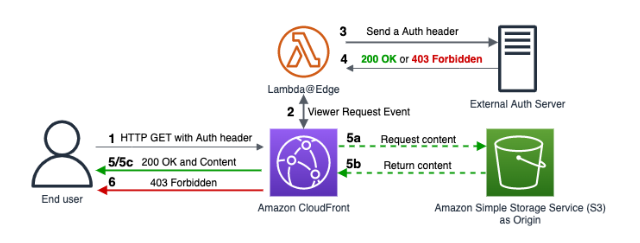
- OAC(オリジンアクセスコントロール)でCloudFront DistributionとS3をつなげる
- 認証はBasic認証で、CloudFront Distributionの配布前に、lambda@edgeで認証を行う
- 下図のExternal Auth Serverまでは用意しない
AWSの設定
S3の設定
S3のバケットを作成する。
- バケット名:
my-mdbook - リージョン:
ap-northeast-1 - ACL: 無効
- Block Public Access: 全てblock
- バケットポリシー: なし(後に)
アップロード:
- その後に
mdbook buildでbuildして、bookフォルダをuploadする - また、次の
index.htmlをドキュメントルートにアップロードする 1
2
3
4
5
6
7
8
9
10
11
12
13
14
15
16
17
18
19
20
21
22
23
24
| <!DOCTYPE html>
<html lang="ja">
<head>
<meta charset="UTF-8">
<meta name="viewport" content="width=device-width, initial-scale=1.0">
<title>Hello</title>
<style>
/* ダークモード対応の最小限のスタイル */
@media (prefers-color-scheme: dark) {
body {
background-color: #222;
color: #eee;
}
a {
color: white;
}
}
</style>
</head>
<body>
<h1>Hello</h1>
<a href="/book/index.html">book</a>
</body>
</html>
|
CloudFrontの設定
CloudFrontのディストリビューションの作成する。
- AWSコンソールでCloudFrontにアクセス
- 「ディストリビューションを作成」をクリック
- 設定:
- オリジンドメイン名:
my-mdbook.s3.amazonaws.com - オリジンアクセス:
OAC - ビューアープロトコルポリシー: Redirect HTTP to HTTPS
- キャッシュポリシー:
CachingDisabled - デフォルトルートオブジェクト:
index.html
S3のOACを設定
- S3のバケットポリシーをOACに合わせて、次のように変更する
- NOTE:
arn:aws:cloudfront::123456789012:distribution/EXAMPLE123の値を適切なものに変える
1
2
3
4
5
6
7
8
9
10
11
12
13
14
15
16
17
18
| {
"Version": "2012-10-17",
"Statement": [
{
"Effect": "Allow",
"Principal": {
"Service": "cloudfront.amazonaws.com"
},
"Action": "s3:GetObject",
"Resource": "arn:aws:s3:::my-mdbook/*",
"Condition": {
"StringEquals": {
"AWS:SourceArn": "arn:aws:cloudfront::123456789012:distribution/EXAMPLE123"
}
}
}
]
}
|
Lambdaを作成
AWS Lambdaに新しい関数を作成する。
- 言語:
Python 3.9 - Region:
us-east-1- LambdaをEdge側でデプロイするには、
us-east-1にする必要がある
- ID, PWは適宜変更する
/などのフォルダにアクセスしたらindex.htmlに変える
 1
 2
 3
 4
 5
 6
 7
 8
 9
10
11
12
13
14
15
16
17
18
19
20
21
22
23
24
25
26
27
28
29
30
31
32
33
34
35
36
37
38
39
40
41
42
43
44
45
46
47
48
49
50
51
52
53
54
| import base64
USERNAME = "admin"
PASSWORD = "password"
def lambda_handler(event, context):
request = event["Records"][0]["cf"]["request"]
headers = request["headers"]
# 認証ヘッダーを取得
auth_header = headers.get("authorization", [{}])[0].get("value", "")
# 認証ヘッダーが空または形式が不正な場合
if not auth_header.startswith("Basic "):
return generate_401_response()
# Basic の後の部分を取得してデコード
try:
auth_value = auth_header[6:] # "Basic " の後の部分
decoded_auth = base64.b64decode(auth_value).decode('utf-8')
username, password = decoded_auth.split(':')
# ユーザー名とパスワードを検証
if username == USERNAME and password == PASSWORD:
# 認証成功時に `index.html` の処理を追加
request["uri"] = rewrite_uri(request["uri"])
return request
except Exception:
# デコードエラーなどの例外処理
pass
# 認証失敗
return generate_401_response()
def rewrite_uri(uri):
"""
フォルダにアクセスされた場合、index.html にリダイレクト
"""
if uri.endswith('/'):
return uri + "index.html"
elif '.' not in uri: # 拡張子がない場合(フォルダの可能性あり)
return uri + "/index.html"
return uri
def generate_401_response():
return {
"status": "401",
"statusDescription": "Unauthorized",
"headers": {
"www-authenticate": [{"key": "WWW-Authenticate", "value": 'Basic realm="Please enter your credentials"'}],
"content-type": [{"key": "Content-Type", "value": "text/html"}]
},
"body": "Please enter your username and password to access this content."
}
|
LambdaのIAM Roleの修正
- LambdaをEdgeで動かすには、IAM Roleの信頼されたエンティティを修正する必要がある
- IAM > Role > 信頼関係 > 信頼されたエンティティで、次のJSONに修正する
1
2
3
4
5
6
7
8
9
10
11
12
13
14
15
| {
"Version": "2012-10-17",
"Statement": [
{
"Effect": "Allow",
"Principal": {
"Service": [
"lambda.amazonaws.com",
"edgelambda.amazonaws.com" // <- 追加
]
},
"Action": "sts:AssumeRole"
}
]
}
|
Lambdaのデプロイ
Lambda > アクション > CloudFront でデプロイをする。
- 設定
- ディストリビューション: 作ったDistributionを選択する
- キャッシュ動作:
* - CloudFront イベント:
Viewer Request
- 権限周りでエラーが出た場合
- マネージメントコンソールをリロードする
- リロードしないと設定がIAMの修正の設定が反映されない事があるため
- デプロイ
- 初回: 新しいCloudFrontトリガーの設定
- 2回目以降: この関数で既存のCloudFrontトリガーを使用
アクセステスト
- CDNのURLにアクセスして動作確認をする
https://xxxxxxxxxxxx.cloudfront.net/とか
CICDの設定
IAMロールの注意
IAMロールには2つの側面があるので注意。
- 信頼ポリシー(Trust policy)
- 「誰がこのロールを使っていいか」
- 例: repo:3265/xxx:ref:refs/heads/main のみOK
- アクセス許可ポリシー(Permissions policy)
- 「このロールを使って何ができるか」
- 例: S3 にファイルを Put/Delete/List できる など
OIDCプロバイダの作成
- IAM > IDプロバイダ > 「プロバイダを追加」
- 条件
- プロバイダのタイプ: OIDC
- プロバイダのURL:
https://token.actions.githubusercontent.com - 対象者(クライアントID):
sts.amazonaws.com
IAMロールの作成
- IAM > ロール > 新規作成
- 条件
- エンティティタイプ: ウェブエンティティ
- プロバイダー:
https://token.actions.githubusercontent.com - Audience:
sts.amazonaws.com - Github組織: ur username
- repository:
rmc - branch:
main
- 許可ポリシー:
AmazonS3FullAccess - Role名:
rmc-mdbook-github-role
リポジトリ側の設定
.github/workflow/deploy.yamlを用意する- 後はpushでデプロイされる
 1
 2
 3
 4
 5
 6
 7
 8
 9
10
11
12
13
14
15
16
17
18
19
20
21
22
23
24
25
26
27
28
29
30
31
32
33
34
35
36
37
38
39
40
41
42
43
| name: Build and Deploy mdBook to S3 via OIDC
on:
push:
branches:
- main # ← 必要に応じて変更
permissions:
id-token: write
contents: read
jobs:
deploy:
runs-on: ubuntu-latest
steps:
- name: リポジトリをチェックアウト
uses: actions/checkout@v3
- name: Rust環境と mdBookツールのインストール
run: |
sudo apt-get update
sudo apt-get install -y curl
curl -sSL https://sh.rustup.rs | sh -s -- -y
source $HOME/.cargo/env
cargo install mdbook
cargo install mdbook-mermaid
cargo install mdbook-katex
- name: mdBook をビルド
run: |
source $HOME/.cargo/env
mdbook build
- name: AWS OIDC 認証
uses: aws-actions/configure-aws-credentials@v2
with:
role-to-assume: arn:aws:iam::<YOUR_AWS_ACCOUNT_ID>:role/<YOUR_ROLE_NAME>
aws-region: ap-northeast-1 # 東京リージョン(必要に応じて変更)
- name: book フォルダごと S3 にアップロード
run: |
aws s3 sync book/ s3://XXX/book --delete
|
参考文献